Home » Woocommerce » Chatbot AI Sales & Support Assistant for WooCommerce
Sale!
Chatbot AI Sales & Support Assistant for WooCommerce
89,00€Original price was: 89,00€.59,00€Current price is: 59,00€.
WooCommerce AI Sales & Support Assistant
Answer customer questions, recommend products and reduce support tickets — automatically.
Turn your WooCommerce store into a 24/7 sales and support assistant.
This AI-powered chatbot helps customers find the right products, get instant answers and complete purchases without human intervention.
Instant and accurate answers to customer questions, 24/7
Smart product recommendations based on cart and browsing behavior
Semantic search across products, pages and FAQs
Automatic reorder and one-click cart suggestions
Fewer repetitive tickets, more time for your business
Built for WooCommerce stores that want to sell more, reduce support costs and automate customer interactions — risk free.
WooCommerce AI Chatbot Plugin for Sales and Customer Support
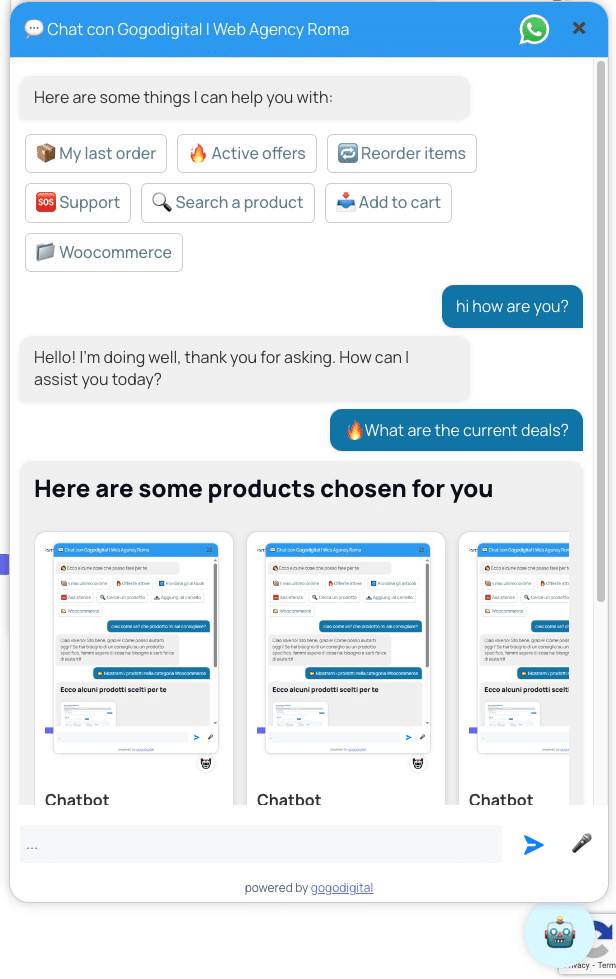
Chatbot WooCommerce AI is an AI sales and customer support assistant built specifically for WooCommerce stores. It answers customer questions, searches your live product catalog, recommends relevant products, helps with cart and order actions, and guides shoppers toward the next step.
Instead of showing random suggestions or forcing customers through rigid predefined flows, the assistant understands the request first and accesses WooCommerce data only when the conversation requires products, offers, variations, cart information or authorized order details.
WooCommerce nativeAI product searchSales assistantCustomer supportMultilingualOpenAI API
CustomerI'm looking for a product that fits my needs, but I'm not sure which one to choose.
AI AssistantI can help. Tell me what you're looking for and I can compare suitable products from the store.
€59/year1 website license
Your API keyDirect OpenAI usage
AI SALES + SUPPORT
An AI chatbot that works with your WooCommerce store, not beside it
The assistant combines natural conversation with live WooCommerce functions. It can answer general questions without touching the catalog and call store tools only when accurate commercial information is actually required.
Products
Product guidance
Searches the catalog, helps customers compare options and returns relevant products with useful store information.
Cart
Cart actions
Can help customers move from conversation to purchase by adding requested products through the intended workflow.
Orders
Order and reorder help
Authorized customers can receive useful order information and start repeat-purchase workflows when supported.
Support
Customer assistance
Answers repetitive questions and can route requests toward the support channels configured by your store.
BUILT FOR ONLINE SELLERS
Useful when customers need help, discreet when they don't
A WooCommerce AI chatbot should reduce friction, not become another annoying popup.
The widget can be used on product pages, cart, checkout and support areas. Store owners can configure messages, assistant behavior, support settings and where the experience should be available.
The goal is to help customers at the moment a question is preventing them from choosing a product, completing an action or understanding what to do next.
Live catalog data
Product information, pricing and availability are retrieved from WooCommerce when needed.
Multilingual replies
The assistant can follow the language used by the customer during the conversation.
Performance focused
The chat widget loads asynchronously so it does not need to block normal browsing.
Configurable privacy
Conversation storage is optional and retention settings can be configured by the store.
SIMPLE SETUP
Install your WooCommerce AI chatbot and start helping customers in a few steps
01
Install
Upload the plugin, activate it and enter your license information.
02
Connect OpenAI
Enter your OpenAI API key and choose the model that fits your requirements.
03
Configure
Set assistant instructions, tone, quick actions, support options and widget preferences.
ONE WEBSITE
€59/year
WooCommerce AI Chatbot license
Plugin license for one WooCommerce website.
OpenAI usage is billed separately by OpenAI according to the model and API usage generated by your store.
HOW IT WORKS
A WooCommerce AI assistant connected to real store data
The assistant does not need to treat every message as a product search. It understands the conversation first and then decides whether WooCommerce information is required.
01. Understand
Interprets the request
General questions receive a conversational response while product or order requests trigger the relevant store workflow.
02. Retrieve
Uses WooCommerce tools
When required, the assistant works with products, offers, details, cart actions or permitted order information.
03. Act
Guides the next step
Customers receive useful information and can continue toward a product, cart action, reorder or support channel.
WOOCOMMERCE AI CHATBOT FEATURES
What our WooCommerce AI Chatbot Plugin can do
The plugin is designed to remove friction from product discovery, repetitive questions and common shopping actions without replacing the store catalog or pretending that AI knows information it cannot access.
Product discovery
Conversational product search
Customers can describe what they need using natural language instead of knowing the exact product name, category or filter combination.
The assistant can query WooCommerce and return relevant catalog information to help shoppers choose.
Catalog
Product details and variations
The chatbot can work with available product information such as attributes, variations and other catalog details when they are needed to answer the customer's question.
Useful for stores where customers often need help understanding product differences.
Promotions
Active offers from WooCommerce
When a visitor asks about promotions, the assistant can use the actual WooCommerce store data instead of inventing discounts or relying on stale marketing text.
Pricing and offers remain controlled by your ecommerce configuration.
Cart
Assisted cart actions
Customers can ask for practical shopping actions, helping shorten the path between finding the right item and proceeding toward checkout.
The conversation becomes part of the shopping journey rather than a separate support experience.
Orders
Order assistance and reordering
When the correct authorization and workflow are available, returning customers can receive useful order information and initiate a repeat-purchase flow.
This can be particularly useful for stores with recurring purchases and B2B customers.
Support
Pre-sales and after-sales assistance
Provide useful information about products, shipping, payments, returns, brand policies and support procedures directly in the conversation.
When human assistance is preferable, the customer can be guided toward the support channels configured by the store.
AI SHOPPING ASSISTANT
Help shoppers find products without forcing them through endless filters
Traditional ecommerce search works well when customers already know what they want. Conversation can help when they don't.
A visitor may know the problem they need to solve, the budget they have or a few characteristics they care about without knowing your product names or catalog structure.
The chatbot can use that natural-language request as the starting point and guide the visitor toward suitable products available in WooCommerce.
Examples of customer questions
“Which product is best for my needs?” The assistant can clarify the request and search relevant products.
“Do you have anything on sale?” It can work with promotions that are actually active in WooCommerce.
“Do you have this in another variation?” Product information can be retrieved from the store catalog.
“I want to buy the same thing again.” Authorized users can use the intended reorder workflow.
“I need human assistance.” The conversation can guide the customer toward your configured support channel.
FOR WOOCOMMERCE STORES
Turn product questions into a clearer path toward purchase
Product discovery, support and store actions can happen in one conversation instead of sending the customer through search boxes, FAQ pages and multiple contact forms.
When an AI chatbot for WooCommerce can make a real difference
The plugin is particularly useful when customers regularly need information before purchasing or when finding the right product requires more than typing a name into a search field.
Large catalogs
Stores with many products
Help visitors navigate a complex catalog using natural questions rather than relying only on categories and filters.
Technical products
Products that need explanation
Answer common questions about attributes, differences and available information before a customer reaches checkout.
Retail
DTC and ecommerce brands
Support customers with product discovery, promotions and common pre-sales questions directly on the store.
B2B
WooCommerce B2B stores
Reduce repetitive requests and provide faster access to useful information for repeat and professional customers.
International
Multilingual customers
Provide an initial conversational experience in the language used by the visitor.
Support load
Stores receiving repetitive questions
Automate first-line answers while keeping human support available for cases that need an operator.
CUSTOMER EXPERIENCE
Keep customers on your website and give them a clear next step
A search box cannot hold a conversation. An FAQ cannot inspect the customer's request. A contact form creates waiting time.
Chatbot WooCommerce AI combines conversational assistance with WooCommerce data and actions when they are actually useful.
The objective is not to make every visitor chat. It is to help the visitors who are stuck, uncertain or ready to perform an action.
A possible customer journey
The visitor asks a question. They write naturally instead of navigating a rigid decision tree.
The assistant understands the intent. It determines whether the question needs conversational knowledge or WooCommerce data.
Relevant store information is retrieved. Products, offers or permitted commerce information can be used when appropriate.
The shopper gets a useful next action. Open a product, continue shopping, perform a supported cart action or contact support.
CONFIGURATION
Configure the WooCommerce AI assistant around your brand
Every store has a different catalog, customer profile and support process. The plugin dashboard lets you adapt the assistant rather than forcing your business into one predefined conversational style.
AI model
Choose the OpenAI model you want to use.
Assistant instructions
Define tone, rules and useful business context.
Widget settings
Configure visible text and conversational options.
Support settings
Configure contact and support information.
TECHNICAL REQUIREMENTS
What you need before activating the plugin
WordPress + WooCommerce
An active WooCommerce store.
OpenAI account
Your own API key with billing enabled.
Store catalog
Accurate products, pricing and descriptions improve the usefulness of commerce answers.
Privacy policy
Update your policy according to the features and data-retention options you enable.
Plugin license
One annual license for each website where the plugin is activated.
WHY THIS PLUGIN
Why choose a WooCommerce AI chatbot connected to live store functions?
A useful ecommerce assistant needs more than a generic language model. It needs a controlled way to access the store information required to answer commerce questions accurately.
Live WooCommerce data
Catalog information can come from the store instead of a manually copied product list.
Your OpenAI account
Use your own API key and choose the model appropriate for your requirements.
Store actions
The assistant can go beyond simple FAQ-style replies when supported WooCommerce actions are required.
Configurable control
Instructions, model, widget behavior, support information and conversation logging remain configurable.
PRIVACY & CONTROL
Control conversation logs and access to store information
An ecommerce chatbot should help customers without exposing information that should remain private.
Order-related functions must follow the intended authorization workflow, while conversation storage can remain disabled if the store does not need it.
If logging is enabled, the store can define retention settings and should describe the chosen configuration accurately in its privacy information.
COSTS & PERFORMANCE
Know the plugin cost and control your AI usage separately
The annual plugin license covers the software for the licensed website and the product benefits included during the license period.
AI usage is separate because it depends on the OpenAI model selected and the volume of conversations generated by the store.
The widget loads asynchronously so normal store navigation does not need to wait for the chat interface.
€59/ YEAR
Add an AI sales and support assistant to your WooCommerce store
One annual license for one website. Connect your OpenAI API key, configure the assistant and adapt the experience to your store.
WooCommerce AI Chatbot Plugin: frequently asked questions
Common questions about installation, OpenAI, WooCommerce data, international customers, privacy and licensing.
Do I need an OpenAI account?
Yes. The plugin uses your OpenAI API key, giving you direct control over the model and API usage.
Is this an AI chatbot specifically for WooCommerce?
Yes. It is designed to work with WooCommerce store data and commerce actions in addition to normal conversational assistance.
Does it search products for every message?
No. The assistant first interprets the request and accesses WooCommerce only when catalog, product, cart, offer or order information is actually needed.
Can customers search products conversationally?
Yes. Customers can explain what they are looking for in natural language and the assistant can use the WooCommerce catalog when the request requires product results.
Can the chatbot help with the cart?
The plugin supports cart-related workflows that allow the conversation to assist customers with supported shopping actions.
Can it help returning customers reorder?
Yes, when the customer is authorized and the intended reorder workflow is available.
Does it work with international customers?
The assistant can follow the language used by the visitor, subject to the information available to provide a reliable answer.
Can I configure the assistant's tone and instructions?
Yes. Store owners can provide operating instructions and useful business context so the experience matches their brand and support process.
Can I disable conversation logs?
Yes. Conversation storage is optional and retention options can be configured according to the store's requirements.
Does the €59 license include OpenAI API usage?
No. OpenAI API requests are billed separately by OpenAI according to the model selected and actual usage.
Can the chatbot completely replace human support?
It is intended to handle common questions and guide customers efficiently. Complex requests can still be directed toward human support.
Will I receive plugin updates?
The annual license includes updates released during the active license period.
Transform your e-commerce today with WooCommerce AI Chatbot Let AI: answer, sell, support, amaze your customers 24/7.
Contact us now for a customized demo or to purchase a license.