Home » Woocommerce » WooCommerce VAT & Tax ID Checkout Plugin (EU Compliant – Vies Validation )
WooCommerce VAT & Tax ID Checkout Plugin (EU Compliant – Vies Validation )
79,90€ Original price was: 79,90€.49,90€Current price is: 49,90€.
WooCommerce VAT Number & Tax ID Checkout Plugin
Add EU VAT numbers, Tax IDs and company billing fields to WooCommerce checkout,
validate EU VAT numbers through VIES, and manage
B2B and B2C checkout rules based on customer type and billing country.
GG Checkout International is built for stores selling across the
EU and worldwide, with full support for
WooCommerce Classic Checkout and
WooCommerce Checkout Blocks / Store API.
- EU VAT Number field with optional VIES validation
- Tax ID / National ID for non-EU companies
- Different checkout fields for individuals and companies
- Country-based visibility and required-field rules
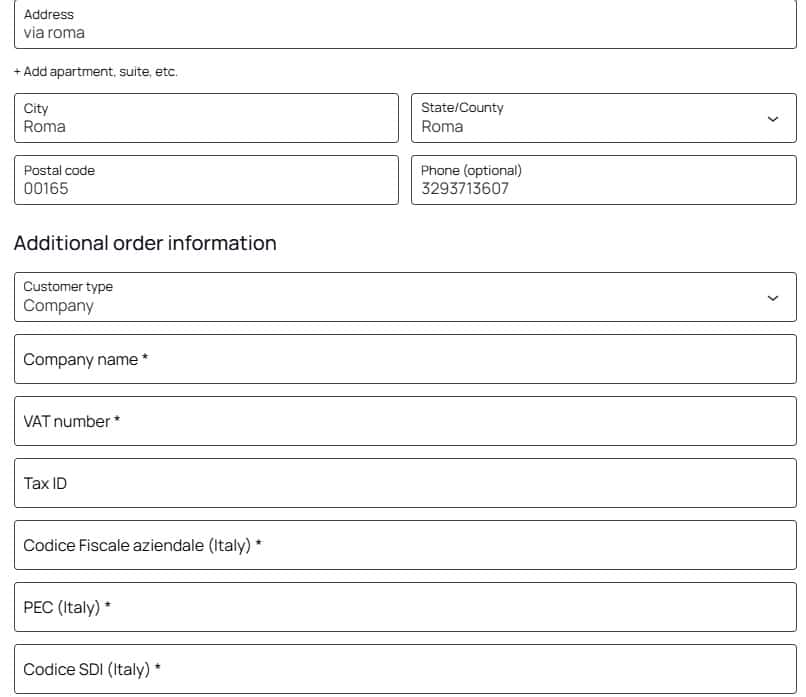
- Support for Italian Codice Fiscale, PEC and SDI
- Support for VAT-exempt eligible intra-EU B2B orders
- Compatible with Classic Checkout + WooCommerce Checkout Blocks
Ideal for international WooCommerce stores selling
physical products, services, software, licenses and digital products.
✅ Works out of the box
✅ 1 year of updates + email support
✅ 14-day refund
Apri un ticket su questo prodotto
WooCommerce VAT Number & Tax ID Plugin for International Checkout
Add EU VAT numbers, Tax IDs and company billing fields directly in WooCommerce checkout, with automatic rules based on customer type and billing country.
GG Checkout International is built for WooCommerce stores selling across the EU and worldwide. It supports VIES VAT validation, B2B and B2C checkout flows, international Tax IDs, Italian invoicing fields and both WooCommerce Classic Checkout and Checkout Blocks.
Collect EU VAT numbers and optionally validate them through VIES.
Collect Tax ID or National ID data for non-EU business customers.
Different checkout fields for individuals and companies.
Works with both WooCommerce Classic Checkout and Checkout Blocks.
VAT, Tax ID and Company Fields in One WooCommerce Plugin
Configure which fiscal fields are displayed, when they are required and how WooCommerce checkout should behave for customers in Italy, the European Union and non-EU countries.
Individual or Company
Show different checkout fields depending on whether the customer is buying as an individual or as a company.
EU VAT Number Validation
Collect EU VAT numbers and optionally validate them through the official VIES service.
Tax ID for Non-EU Customers
Use a dedicated Tax ID / National ID field for companies outside the European Union.
Country-Based Rules
Automatically adapt visible and required checkout fields according to the customer's billing country.
Conditional Visibility
Display fiscal fields only when they are relevant, keeping checkout cleaner for every customer type.
Server-Side Validation
Required fiscal information is validated server-side before the order can be completed.
Customer Type + Billing Country
GG Checkout International combines two key pieces of information: who the customer is and where the customer is located.
The plugin can then display and validate the appropriate fiscal fields without forcing every customer to complete the same billing form.
Italian Checkout
VAT number, Codice Fiscale, PEC and SDI fields can be enabled for Italian customers.
European Union
EU companies can be required to provide a VAT number, with optional VIES validation.
Non-EU
Business customers outside the EU can provide a dedicated Tax ID or National ID.
WooCommerce EU VAT Number & VIES Validation
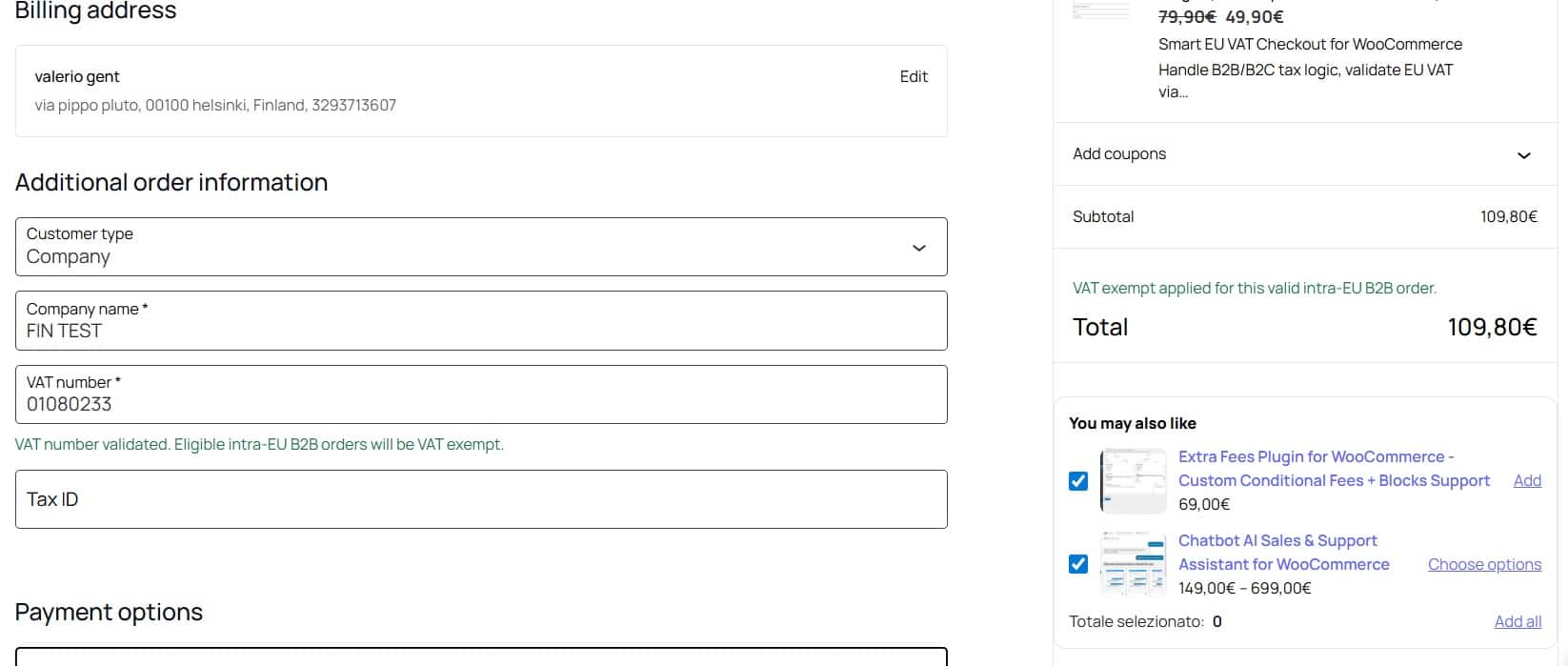
For European business customers, the plugin can collect an EU VAT number and validate it through the official VIES VAT validation service.
- Validate EU VAT numbers during checkout.
- Optionally prevent checkout when a VAT number is invalid.
- Store VAT validation information with the WooCommerce order.
- Handle temporary VIES unavailability according to your configuration.
- Support VAT-exempt treatment for eligible intra-EU B2B transactions when your WooCommerce tax configuration and applicable rules allow it.
International Tax ID and Italian Fiscal Fields
One plugin can handle international company data while preserving specific billing requirements for Italy.
International Companies
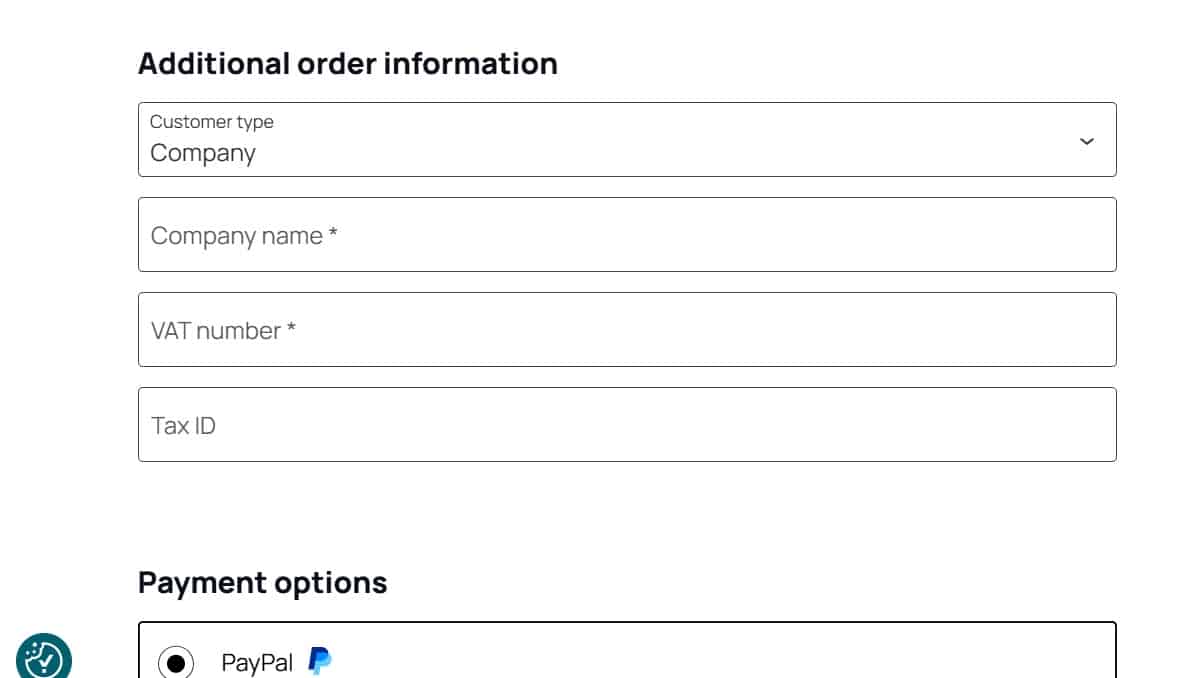
For business customers outside the EU, you can collect international company information without displaying Italy-specific fields that are not needed.
- Company name
- Tax ID / National ID
- Conditional visibility
- Optional or required field configuration
Italy-Specific Fields
For Italian customers, the checkout can collect the fiscal and invoicing fields commonly required by Italian ecommerce workflows.
- VAT number / Partita IVA
- Codice Fiscale for individuals
- Company Codice Fiscale
- PEC
- SDI recipient code
Built for Modern WooCommerce Checkout
Use the same international VAT, Tax ID and company logic with both the traditional WooCommerce checkout and the newer Blocks / Store API checkout.
WooCommerce Checkout Blocks
- WooCommerce additional checkout fields API
- Store API compatible validation
- Dynamic Individual / Company logic
- Dynamic country-based fields
- Server-side validation
- Fields block can be positioned through the Gutenberg editor
Classic WooCommerce Checkout
- Custom fiscal checkout fields
- Individual / Company conditional logic
- Country-based visibility
- Required field validation
- VAT, Tax ID and Italian fiscal data
- Fiscal data saved with the WooCommerce order
Three Ways to Handle B2C and B2B Customers
Individual / Company
Customers select whether they are purchasing as an individual or a company, and checkout fields update automatically.
“Request Invoice?”
Keep checkout simple for consumers and reveal company and fiscal fields only when an invoice is requested.
Company-Only B2B
Configure checkout as a business-only flow with company fields available by default.
Control Field Visibility and Required Rules
Each field can be configured according to the market and customer type you need to support.
This makes it possible to keep checkout clean for consumers while collecting complete business information when required.
| Customer | Typical Fields | Checkout Logic |
|---|---|---|
| Italy · Individual | Codice Fiscale | Personal Italian fiscal data |
| Italy · Company | VAT, CF, PEC, SDI | Italian company invoicing data |
| EU · Company | EU VAT Number | Optional VIES validation |
| Non-EU · Company | Tax ID / National ID | International company data |
Flexible WooCommerce Settings
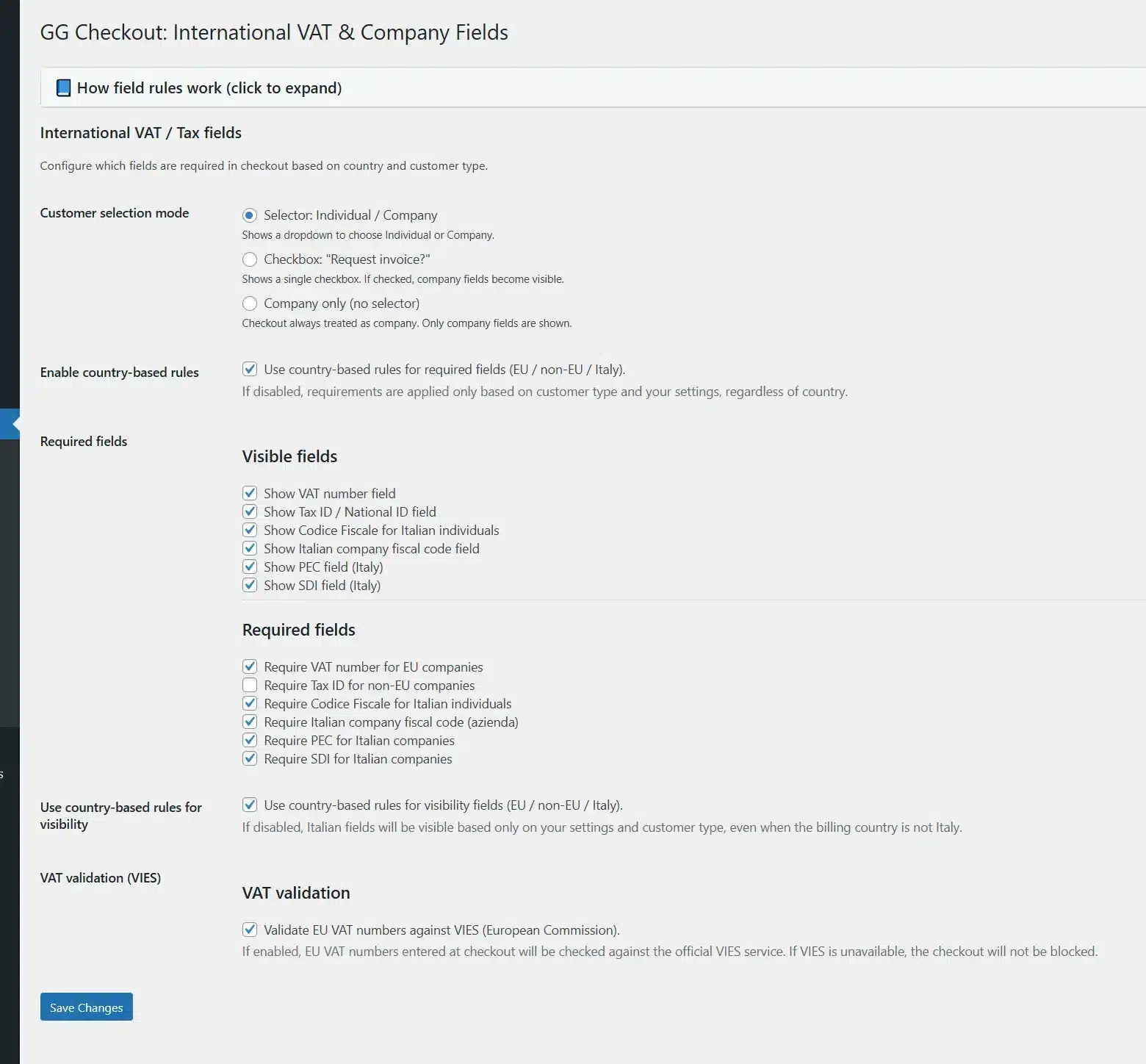
From the GG Checkout International settings page you can:
- choose Individual / Company, Request Invoice or B2B-only mode;
- enable or disable VAT, Tax ID, Codice Fiscale, PEC and SDI;
- define which fields are visible;
- define which fields are required;
- configure EU, non-EU and Italy-specific rules;
- enable optional VIES validation.
Advanced Server-Side Validation
GG Checkout International does more than display fields: it validates required fiscal data according to your rules.
- Dedicated validation for EU companies
- Dedicated validation for non-EU companies
- Italy-specific fiscal validation
- Optional VIES VAT validation
- Clear checkout validation messages
- Configurable behaviour when VIES is temporarily unavailable
Real-World WooCommerce Checkout Examples
Configure the same store for different customer types and markets.
| Scenario | Configuration | Checkout Result |
|---|---|---|
| Italy → Company |
Italy rules enabled Company mode VAT + Italian fields enabled |
Customer can provide VAT number, company Codice Fiscale, PEC and SDI. |
| Italy → Individual |
Italy rules enabled Individual mode Personal Codice Fiscale enabled |
Customer sees the personal Codice Fiscale without unnecessary company fields. |
| France → Company |
EU company rules enabled VAT required VIES validation optional |
EU VAT number is requested while Italy-specific fields remain hidden. |
| USA → Company |
Non-EU company rules enabled Tax ID enabled |
Tax ID is collected while EU and Italian-only fields remain hidden. |
Fiscal Data Saved with the WooCommerce Order
Information collected during checkout is stored with the order so it remains available for administration and downstream workflows.
Basic OSS / IOSS Reporting
The plugin also stores tax-related metadata and includes basic reporting to help identify orders associated with OSS / IOSS workflows.
This functionality does not replace official tax filings, accounting software or professional tax advice.
WooCommerce-Native Integration
The plugin is designed around standard WooCommerce checkout mechanisms instead of replacing the checkout system.
- WooCommerce Classic Checkout
- WooCommerce Checkout Blocks
- WooCommerce Store API
- WooCommerce additional checkout fields API
- Server-side validation
- WooCommerce native tax engine integration
Built for Production Stores
- WordPress 6.x or higher
- PHP 7.4 or higher
- GPL3 license
- 1 year of plugin updates
- 1 year of email support
Compatibility with third-party checkout managers, invoicing extensions or highly customized themes may depend on their individual implementation.
Who Is GG Checkout International For?
Sell across the EU and worldwide.
Handle consumers and companies in one checkout.
Avoid rebuilding fiscal checkout logic from scratch.
Collect and validate EU VAT numbers with VIES.
WooCommerce VAT Number & Tax ID Plugin FAQ
Add VAT Number, Tax ID and B2B Logic to WooCommerce Checkout
One plugin for EU VAT numbers, VIES validation, international Tax IDs, Italian fiscal fields, B2B/B2C customers and WooCommerce Checkout Blocks.
79,90€ Original price was: 79,90€.49,90€Current price is: 49,90€.Add to cart

Complete field checkout selector
B2C / B2B Checkout Logic

Country-Based Field Rules ( EU / Non-EU / Italy )
EU VAT Number Field + VIES Validation

Intra-EU B2B No-VAT Checkout Handling
Italian Invoicing Fields (Codice Fiscale, PEC, SDI)

Tax ID Support for Non-EU Companies
Classic Checkout + WooCommerce Blocks Compatibility
Dynamic Field Visibility and Required Rules
Order Tax Metadata (VIES Status, Tax Treatment, VAT Exempt)
Basic OSS / IOSS Eligibility Reporting
Optional EU Customer Checkout Blocking
Optional Geolocation Country Prefill
WooCommerce Native Tax Engine Integration
One-Year Updates and Support
You may also like
GG Smart Offers – Plugin Upsell e Cross-Sell per WooCommerce
Cross-sell intelligenti, prodotti acquistati insieme, regali automatici, coupon e loyalty in un unico plugin woocommerce. GG Smart Offers…
Extra Fees Plugin for WooCommerce – Custom Conditional Fees + Blocks Support
Create advanced, conditional extra fees that actually work with the new WooCommerce Cart & Checkout Blocks. Advanced Fees…
WooCommerce Quote Plugin with PDF, Online Signature, Deposits & Sales Agents
Turn WooCommerce into a complete quotation and sales management system. Create professional quotes, generate PDF proposals, collect online…


